
Over on my ScienceFix blog I recently shared an idea for using Ai-generated images to create crazy animals to teach about adaptation. One thing I became aware of while writing about it was that most of the AI Image generators seemed to require a login, or couldn’t be used by under 13’s, and that might make it a problem to use in the classroom.
It was pointed out to me that Padlet now had a really cool feature called “I Can’t Draw” where you could generate an image from some text, which made it perfect for this activity.
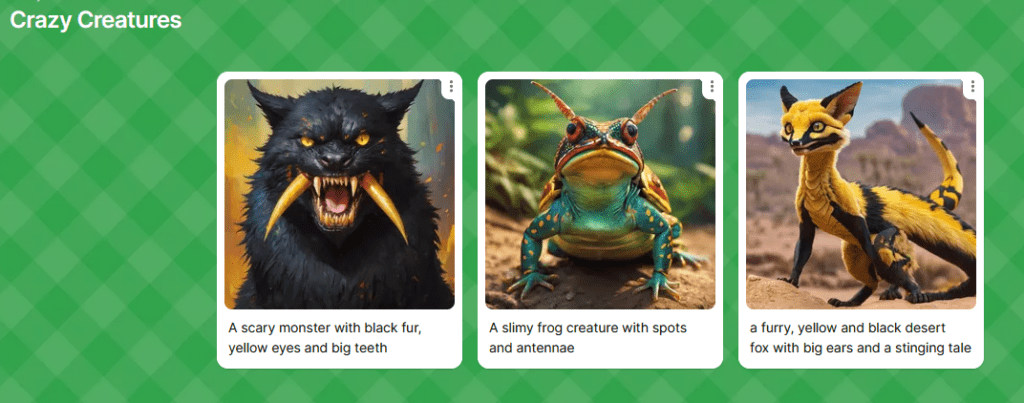
You can have a free Padlet account as a teacher, and share the Padlet with a class via an easy link. They just need to click on the link (or scan the QR code) to access the Padlet and add their images.
To use the image generator, the children need to follow these steps:
- Go into Padlet
- Click on the Plus icon in the bottom right corner of the screen
- Click on the hexagon with the three dots in it to access more attachment types
- From the options choose “I Can’t Draw”
- Type the description of the image you want Padlet to create. See this post for ideas.
- Click the arrow icon
- Choose one of the images it creates for you
- Give the post a Subject if you wish, write some more about the image below, then click on Publish
And that’s it.

This video shows you all the steps.
Look for creative ways to integrate this tool into various subjects, such as English (for storyboarding), Science (for illustrating concepts), or History (for visualizing historical events).
Let me know how you’ve used it in the comments!
Create AI Images with Padlet’s I Can’t Draw Tool
The Whiteboard Blog – Education, Technology, AI and Science CPD and Support